ladbible homepage
ladbible homepage
  • iconNews
  • videos
  • entertainment
  • Home
  • News
    • UK
    • US
    • World
    • Ireland
    • Australia
    • Science
    • Crime
    • Weather
  • Entertainment
    • Celebrity
    • TV
    • Film
    • Music
    • Gaming
    • Netflix
    • Disney
  • Sport
  • Technology
  • Travel
  • Lifestyle
  • Money
  • Originals
    • FFS PRODUCTIONS
    • Say Maaate to a Mate
    • Daily Ladness
    • UOKM8?
    • FreeToBe
    • Citizen Reef
  • Advertise
  • Terms
  • Privacy & Cookies
  • License Our Content
  • About Us & Contact
  • Jobs
  • Latest
  • Archive
  • Topics A-Z
  • Authors
Facebook
Instagram
X
Threads
Snapchat
TikTok
YouTube
Submit Your Content Here
  • SPORTbible
  • Tyla
  • GAMINGbible
  • LADbible Group
  • UNILAD
  • FOODbible
  • UNILAD Tech
People only just realising you can ‘layer’ emojis on iPhone with hidden trick

Home> News> Technology

Published 16:50 27 Apr 2024 GMT+1

People only just realising you can ‘layer’ emojis on iPhone with hidden trick

People are only just finding out about a trick that allows you to stack emojis

Lucy Devine

Lucy Devine

google discoverFollow us on Google Discover

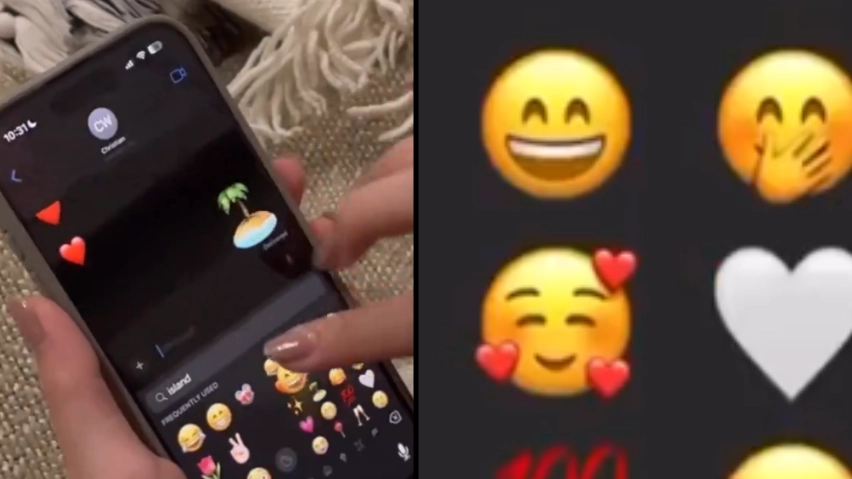
People have just discovered a pretty cool iPhone feature which allows you to stack emojis on iMessage.

The feature means you can essentially create your own emoji art by layering different emojis on top of each other.

So, how is it done?

Did you know you can stack emojis? (Artur Debat/Getty Stock Image)

Advert

New York content creator @thatsannette, shared a video explaining how you can try it yourself.

Essentially, all you need to do is head onto iMessage and send your first emoji - this is the one that you want to layer other emojis on top of.

So ultimately, it's kind of the base emoji.

Then, head back to your emoji library and choose which one you want to stack on top.

Select and drag it onto the message and add it on top of the base emoji. You can then repeat this as many times as you like with other emojis.

You can also use your fingers to make the emojis bigger or smaller.

And if you want to delete an emoji, that's fine. Simply tap and hold the base emoji until the menu appears.

Select 'sticker details' then swipe left on the emoji you want to remove. Once confirmed, the emoji will be removed.

Pretty cool, huh?

"It's so much fun to test your creativity out of this," said @thatsannette.

"Did you guys know about this feature?"

While some people said the feature wasn't working for them, others pointed out that users need to make sure that their iPhone is fully updated.

Last month, we told you how Apple may be about to add an iOS feature that Android implemented some time ago.

While it's not confirmed, there are rumours that Apple is going to introduce a new feature.

It's probably not the most exciting feature ever and for some, it's probably not a crucial addition either.

But others reckon it's a pretty important one to have.

It's all to do with the Apple home screen. As Apple users will know, you can easily customise your home screen.

But if you add a new app, it automatically slots in next to the latest app that's been added.

In other words, there are no gaps and creating a gap isn't possible.

You can move them, organise them into folders, but you cannot leave a gap if you want to.

However, people are speculating that with the upcoming iOS 18 update, this is something you'll finally be able to do.

We'll have to wait to find out!

Featured Image Credit: Instagram/@thatsannette

Topics: Apple, Technology, iPhone, News

Lucy Devine
Lucy Devine

Recommended reads

Man drinks alcohol and lifts weight for 90 days straight to see how bad it actually is(YouTube/@Clawhammer Supply)How much a pint costs at the 2026 Grand National, get your overdraft readyCarl De Souza/GettyNASA 'anxious' as Artemis crew approach fireball return reaching 23,839 mph speeds(NASA via Getty Images)Extreme physical changes to Artemis II crew's body after 10 days in spaceNASA via Getty Images

Advert

Choose your content:

8 hours ago
9 hours ago
10 hours ago
  • Carl De Souza/Getty
    8 hours ago

    How much a pint costs at the 2026 Grand National, get your overdraft ready

    There will be plenty of sore heads on Sunday morning

    News
  • (NASA via Getty Images)
    9 hours ago

    NASA 'anxious' as Artemis crew approach fireball return reaching 23,839 mph speeds

    The crew's return to Earth is considered the 'most dangerous' part of the journey

    News
  • NASA via Getty Images
    9 hours ago

    Extreme physical changes to Artemis II crew's body after 10 days in space

    They're set to be welcomed back to Earth this evening

    News
  • (KENNEDY)
    10 hours ago

    Signs of throat cancer as man's diagnosis linked to oral sex decades ago

    Health experts have linked an increased risk of throat cancer to oral sex

    News
  • People outraged over major thing missing from Apple's iPhone 17 announcement
  • New iPhone 17 has 'shocking' major flaw that people can't get over
  • Startling truth behind little green and orange dot that appears on your iPhone
  • Apple's official advice on whether it's safe to charge your iPhone overnight following expert's warning